
FAQs
Answers to common questions about custom printing, embroidery, minimum orders, pricing and turnaround. Can't find what you need? Contact our team.
Can I come into the showroom?
Yes, our fully stocked showroom at Unit 5/16 Sundercombe St, Osborne Park WA 6017 is open Monday to Thursday 9:00am – 4:30pm and Friday 9:00am – 3:30pm. You can drop in to browse stock, view samples, or place and collect orders. If you'd like specialised help from one of our experts, you can book a meeting on our contact page.
Can I order online?
Yes, you can.
Placing an order online
If you wish to design your own or use one of our designs, start designing here. There is no minimum order, decoration is in full-colour Direct to Garment (DTG) digital printing, and you can collect from our store in Osborne Park or have your order shipped Australia-wide.
We are happy to check over your artwork for orders under 20 units. However, we do have a strict minimum of 20 units for in-store orders and artwork processing.
Ordering 20+ units online
If you need a more personal touch, can't make it to the store, and are ordering 20 or more units, we can help you customise your garments and choose the best decoration method by email. We offer online quoting and approvals, online payment, proofing, and shipping options as required.
Simply request a quote or email our apparel experts at sales@fabricprinter.com.au. Alternatively, you can contact one of our apparel experts directly:
- Corrine – corrine@fabricprinter.com.au
- Nikia – nikia@fabricprinter.com.au
- Joe – joe@fabricprinter.com.au
- Sally – sally@fabricprinter.com.au
Is there a minimum order?
Yes, we do have a minimum. They are as follows:
- Screen printing: 20 units per design. Learn more about screen printing.
- Embroidery: 1 unit per design. No minimum order via our Design Your Own store.
- Digital printing (DTG & DTF): 1 unit per design.
- Design Your Own digital printing: No minimum order via our online design tool.
- Blanks: 20 units. Please send us a quote request.
You can generally mix and match sizes and garment styles to reach the minimum order.
How do I know what size to order?
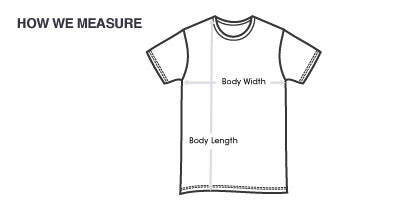
To work out your size, lay your shirt down flat and measure it as per the diagram below. Compare that measurement to the size chart supplied on each product page.
How does pricing for screen printing work?
Pricing for screen printing is based on three variables:
- The number of garments to be decorated.
- The number of colours in each print.
- The number of prints on each garment, for example front only, or front, back and sleeve.
To give you an accurate price, we need to know these three variables. Include them in your quote request.
How does pricing for digital printing work?
Pricing for digital printing (DTG and DTF) is based on three variables:
- The number of garments to be decorated.
- The number of prints on each garment, for example front only, or front and back.
- The size of the logos or prints.
Learn more about our printing methods on our services page.
How does pricing for embroidery work?
Why do more colours cost more?
In screen printing, we have to set up a separate screen for every colour in every print. The more screens, the higher the setup costs. It also takes longer to print more colours. For example, a 4-colour print needs 4 separate print passes on each tee.
What t-shirt brands do you use?
We use trusted brands including:
Browse our range of men's T-shirts and women's T-shirts.
What is the maximum number of colours you can print?
We can screen print up to 12 spot PMS colours on white garments (11 on coloured or dark garments). Another option is CMYK process printing. PMS colour matching is not available with this method, and there may be some colour shifting within your order.
How long will my job take?
Online orders (1 to 20 units)
We offer three turnaround options for all online orders:
- Express: 24 hours
- Rush: 2 to 3 days
- Standard: 4 to 14 days
Screen printing orders (20+ units)
Our standard turnaround is 10 to 14 working days from artwork approval. We are happy to provide a rush service for a small additional cost. Please call us on (08) 9244 9000 or email sales@fabricprinter.com.au to arrange this.
Embroidery orders (1+ units)
Our standard turnaround is 14 to 21 working days from artwork approval. We are happy to provide a rush service for a small additional cost. Please call us on (08) 9244 9000 or email sales@fabricprinter.com.au to arrange this.
What file type do you need for the artwork?
For the majority of spot colour work, we require a vector image file created in a program like Adobe Illustrator or CorelDRAW. These files have extensions such as .AI, .EPS, .PDF, .SVG and .CDR.
Note that not all files with these extensions are vector image files. For example, a bitmap image can be saved in nearly all of these file types. The file has to be created as a vector from scratch in one of the programs above. See our art specs for full details.
Can I supply my own stock?
No, we do not accept supplied stock. The only way for us to guarantee our work is to supply the whole order, so we can control the print variables involved in producing your goods. We carry a large amount of stock on hand, which generally allows us to fix any issues that may arise. This allows us to offer a replacement guarantee on everything we supply. See our refund policy for details.
Can you design the logo we want printed?
Yes. Subject to availability, our in-house graphic designers can create the look you are after. Turnaround time and price will vary depending on the design requirements. From a t-shirt design to a complete corporate image, we can give your business, brand or organisation a professional look. Get in touch to discuss your design.
Will I need to pay a setup fee?
No, we do not charge setup fees.
How can I reduce the cost per shirt?
There are a few different ways to reduce your costs:
- Increase the number of garments ordered.
- Reduce the number of colours in each design.
- Reduce the number of locations being decorated.
Our team can recommend the most cost-effective option when you request a quote.
What is the difference between a bitmap and a vector file?
Bitmaps (also called raster images) are made up of pixels, while vector images are made from mathematical formulas of points and curves. Making a bitmap larger also makes the pixels larger, so the result can look blurry and jagged. Photos are bitmap images, and so are file formats like .BMP, .JPG, .PNG and .PSD.
Vector images have crisp lines and can be resized to any size without losing image quality. Vector images are created in programs like Adobe Illustrator and CorelDRAW.
Why do you require vector images?
Vector images are made out of lines and shapes, which helps us separate the colours. Each shape of the same colour is separated from the image. This can't be done effectively with a bitmap image when printing with spot colours.
Bitmap images are acceptable for our digital printing (DTG and DTF) and CMYK blended print process. They are occasionally acceptable for single-colour prints at a minimum of 300dpi. If in doubt, please send your artwork to your sales consultant to check. See our art specs for more information.
What does “convert fonts to outlines” or “embed fonts” mean?
Fonts aren't automatically included in a vector file created in a program like Adobe Illustrator. When you use a font, the text is linked to a font file on your computer. If that text isn't converted to outlines (shapes) or embedded, and we don't have the same font installed, it will be replaced with a different font on our system.
To avoid this, convert your fonts to outlines or embed them. In Adobe Illustrator, right-click the text and choose Create Outlines, go to Type > Create Outlines, or use the shortcut Shift + Ctrl + O (Shift + Cmd + O on a Mac). This converts all your text to shapes, so it displays correctly in your file.